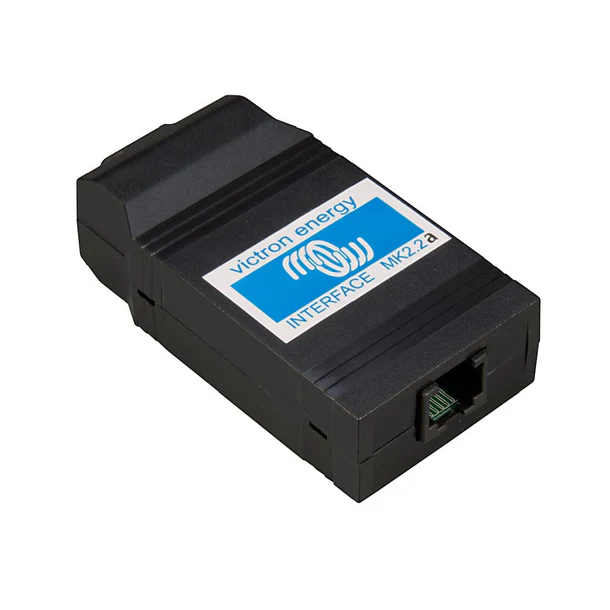
Victron ASS030120200 Interface MK2.2b (VE.Bus to RS232)
Victron ASS030120200 Interface MK2.2b (VE.Bus to RS232)
Professional VE.Bus to RS232 interface enabling direct computer connection for configuration, monitoring, and control of Victron VE.Bus devices via standard RS232 serial communication ports. The Victron Interface MK2.2b provides a reliable hardware bridge between VE.Bus-equipped Victron Energy products and computers, allowing system configuration, parameter adjustment, firmware updates, and real-time monitoring through the free VE-Configure software. This essential interface tool enables professional installers and system owners to access advanced settings, perform diagnostics, and optimize performance of Multi, MultiPlus, MultiGrid, Quattro, and other VE.Bus-compatible inverter/charger systems without requiring specialized equipment or complicated setup procedures.
Product Overview
The MK2.2b interface represents Victron Energy's standard communication solution for VE.Bus device configuration and management. VE.Bus is Victron's proprietary communication protocol used across their inverter/charger product range, enabling parallel operation, system monitoring, and centralized control of multiple units. This interface translates VE.Bus signals to RS232 serial communication, a universal standard supported by computers through native serial ports or widely available USB-to-RS232 adapters.
Professional installers rely on the MK2.2b interface for commissioning new systems, updating firmware, troubleshooting operational issues, and fine-tuning parameters to match specific installation requirements. System owners use the interface for ongoing monitoring, configuration adjustments, and performance optimization as their power requirements evolve. The interface works seamlessly with Victron's free VE-Configure software, providing intuitive access to comprehensive configuration options without requiring technical programming knowledge.
Key Features
VE.Bus to RS232 Conversion: Direct communication bridge between Victron VE.Bus devices and computer RS232 serial ports enabling configuration and monitoring access.
VE-Configure Software Compatibility: Works seamlessly with Victron's free VE-Configure software providing intuitive graphical interface for device configuration and parameter adjustment.
Universal Computer Connectivity: Standard RS232 serial connection compatible with native serial ports or USB-to-RS232 adapters for modern computers without serial ports.
Professional Configuration Access: Enables adjustment of advanced parameters, custom settings, and system optimization options not accessible through device control panels.
Firmware Update Capability: Facilitates firmware updates for connected VE.Bus devices ensuring access to latest features, improvements, and bug fixes.
Multi-Device Support: Compatible with full range of VE.Bus-equipped Victron products including MultiPlus, Quattro, Multi, MultiGrid, and other inverter/charger systems.
Real-Time Monitoring: Provides live data access for system performance monitoring, fault diagnosis, and operational verification during commissioning and troubleshooting.
Compact Durable Design: Rugged construction suitable for field use with reliable connectivity ensuring consistent performance in professional installation environments.
Technical Specifications
| Specification | Details |
|---|---|
| Model Number | ASS030120200 |
| Product Name | MK2.2b VE.Bus to RS232 Interface |
| Connection Type | VE.Bus to RS232 Serial |
| Computer Connection | DB9 RS232 Serial Connector |
| VE.Bus Connection | RJ45 Connector (VE.Bus Standard) |
| Compatible Software | VE-Configure (Free Download) |
| Power Supply | Powered via VE.Bus (No External Power Required) |
| Compatibility | VE.Bus Devices |
| Manufacturer | Victron Energy |
Frequently Asked Questions
Q: Do I need this interface to use my Victron inverter/charger?
A: The inverter/charger operates independently without the interface using front panel controls or remote switches. The MK2.2b interface is required for accessing advanced configuration settings, performing firmware updates, configuring parallel systems, and using VE-Configure software for detailed parameter adjustment.
Q: Will this interface work with my computer that doesn't have a serial port?
A: Yes, the interface works with USB-to-RS232 adapters for modern computers without native RS232 serial ports. Use a quality FTDI-based USB-to-RS232 adapter for best compatibility and reliability. Ensure proper driver installation for the adapter.
Q: What's the difference between MK2.2b and other Victron communication products?
A: The MK2.2b provides direct computer connection via RS232 for configuration using VE-Configure software. The VE.Bus Smart Dongle enables Bluetooth monitoring via smartphone apps. The Color Control GX and Cerbo GX provide comprehensive system monitoring, data logging, and remote access. Each serves different purposes in system management.
Q: Is the VE-Configure software free?
A: Yes, VE-Configure software is available as a free download from the Victron Energy website. No license purchase or subscription is required for full functionality.
Q: Can I configure multiple devices with one interface?
A: Yes, the interface can configure any VE.Bus device by connecting to its VE.Bus port. For parallel or three-phase systems, connect to any one device's VE.Bus port to configure the entire connected system.
Original: $57.84
-65%$57.84
$20.24Product Information
Product Information
Shipping & Returns
Shipping & Returns
Description
Victron ASS030120200 Interface MK2.2b (VE.Bus to RS232)
Professional VE.Bus to RS232 interface enabling direct computer connection for configuration, monitoring, and control of Victron VE.Bus devices via standard RS232 serial communication ports. The Victron Interface MK2.2b provides a reliable hardware bridge between VE.Bus-equipped Victron Energy products and computers, allowing system configuration, parameter adjustment, firmware updates, and real-time monitoring through the free VE-Configure software. This essential interface tool enables professional installers and system owners to access advanced settings, perform diagnostics, and optimize performance of Multi, MultiPlus, MultiGrid, Quattro, and other VE.Bus-compatible inverter/charger systems without requiring specialized equipment or complicated setup procedures.
Product Overview
The MK2.2b interface represents Victron Energy's standard communication solution for VE.Bus device configuration and management. VE.Bus is Victron's proprietary communication protocol used across their inverter/charger product range, enabling parallel operation, system monitoring, and centralized control of multiple units. This interface translates VE.Bus signals to RS232 serial communication, a universal standard supported by computers through native serial ports or widely available USB-to-RS232 adapters.
Professional installers rely on the MK2.2b interface for commissioning new systems, updating firmware, troubleshooting operational issues, and fine-tuning parameters to match specific installation requirements. System owners use the interface for ongoing monitoring, configuration adjustments, and performance optimization as their power requirements evolve. The interface works seamlessly with Victron's free VE-Configure software, providing intuitive access to comprehensive configuration options without requiring technical programming knowledge.
Key Features
VE.Bus to RS232 Conversion: Direct communication bridge between Victron VE.Bus devices and computer RS232 serial ports enabling configuration and monitoring access.
VE-Configure Software Compatibility: Works seamlessly with Victron's free VE-Configure software providing intuitive graphical interface for device configuration and parameter adjustment.
Universal Computer Connectivity: Standard RS232 serial connection compatible with native serial ports or USB-to-RS232 adapters for modern computers without serial ports.
Professional Configuration Access: Enables adjustment of advanced parameters, custom settings, and system optimization options not accessible through device control panels.
Firmware Update Capability: Facilitates firmware updates for connected VE.Bus devices ensuring access to latest features, improvements, and bug fixes.
Multi-Device Support: Compatible with full range of VE.Bus-equipped Victron products including MultiPlus, Quattro, Multi, MultiGrid, and other inverter/charger systems.
Real-Time Monitoring: Provides live data access for system performance monitoring, fault diagnosis, and operational verification during commissioning and troubleshooting.
Compact Durable Design: Rugged construction suitable for field use with reliable connectivity ensuring consistent performance in professional installation environments.
Technical Specifications
| Specification | Details |
|---|---|
| Model Number | ASS030120200 |
| Product Name | MK2.2b VE.Bus to RS232 Interface |
| Connection Type | VE.Bus to RS232 Serial |
| Computer Connection | DB9 RS232 Serial Connector |
| VE.Bus Connection | RJ45 Connector (VE.Bus Standard) |
| Compatible Software | VE-Configure (Free Download) |
| Power Supply | Powered via VE.Bus (No External Power Required) |
| Compatibility | VE.Bus Devices |
| Manufacturer | Victron Energy |
Frequently Asked Questions
Q: Do I need this interface to use my Victron inverter/charger?
A: The inverter/charger operates independently without the interface using front panel controls or remote switches. The MK2.2b interface is required for accessing advanced configuration settings, performing firmware updates, configuring parallel systems, and using VE-Configure software for detailed parameter adjustment.
Q: Will this interface work with my computer that doesn't have a serial port?
A: Yes, the interface works with USB-to-RS232 adapters for modern computers without native RS232 serial ports. Use a quality FTDI-based USB-to-RS232 adapter for best compatibility and reliability. Ensure proper driver installation for the adapter.
Q: What's the difference between MK2.2b and other Victron communication products?
A: The MK2.2b provides direct computer connection via RS232 for configuration using VE-Configure software. The VE.Bus Smart Dongle enables Bluetooth monitoring via smartphone apps. The Color Control GX and Cerbo GX provide comprehensive system monitoring, data logging, and remote access. Each serves different purposes in system management.
Q: Is the VE-Configure software free?
A: Yes, VE-Configure software is available as a free download from the Victron Energy website. No license purchase or subscription is required for full functionality.
Q: Can I configure multiple devices with one interface?
A: Yes, the interface can configure any VE.Bus device by connecting to its VE.Bus port. For parallel or three-phase systems, connect to any one device's VE.Bus port to configure the entire connected system.