IROAD X-Security Cover Suit X10/X11 & FX/QX Series
Security Accessory For IROAD X10/X11 & FX/QX Series!
Secure All Cables With The X-Security Cover
The IROAD X-Security Cover helps to keep cables neat. Furthermore, it prevents damage and physical access to the cables of your X10/X11 and/or FX/QX Series Dash Camera. It is a great method to protect your dash cam and your vehicle!
Prevent Memory Card Corruption
The IROAD X-Security Cover is a security accessory to protect Micro SD card slot from physical access, so that video files cannot be damaged or deleted.
IROAD X-Security Cover Installation:
- Place the security cover top plate to the X10/X11 or FX/QX Series.
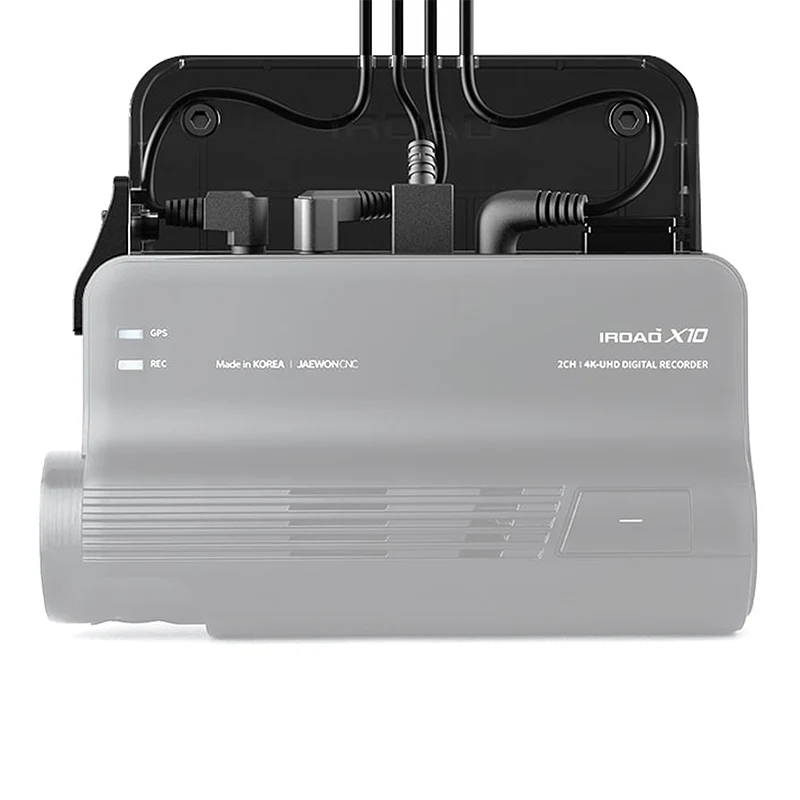
- Connect each cable to the X10/X11 or FX/QX Series and organize the cables in each hole of the cover.
- Cables should be organized in order from the left.
- After fastening the bottom part of the multi-cover to top plate, tighten the screw.
- Tighten the SD cover with screw.
Steps:
- Adjust X-Security Cover and front camera of X10 and push it until it clicks into place.
- Remove double-sided tape film of the X-Security Cover and attach it to the selected location.
- Place the top cover and organized the cables. (Place the cables from left to right relative to the holes in the top cover)
- After connecting the GPS cable to the X10/X11 (not required for the FX/QX Series), place the cable to the first hole from the left. (Place the GPS cable molding towards left to connect easily)
-
After connecting the optional OBDII x-scanner cable to the X10/X11, place the cable to the second hole position. This is not used on the FX/QX Series. (Place the OBDII scanner cable molding towards right to connect easily)
- After connecting the rear cable to the X10/X11/FX2, place the cable to the third hole position.
- After connecting the power cable to the dash camera, place the cable to the first hole from the right (Place the power cable molding towards right to connect easily)
- After connecting the cables, place the bottom cover case with the top cover together and push it to the bottom to tighten.
- Tighten the screws with an allen wrench. After assembling the top, bottom cover, place the SD card cover and tighten the screws.
Compatibility:
- IROAD FX / QX Series Dashcam
- IROAD X10 / X11 Series Dashcam
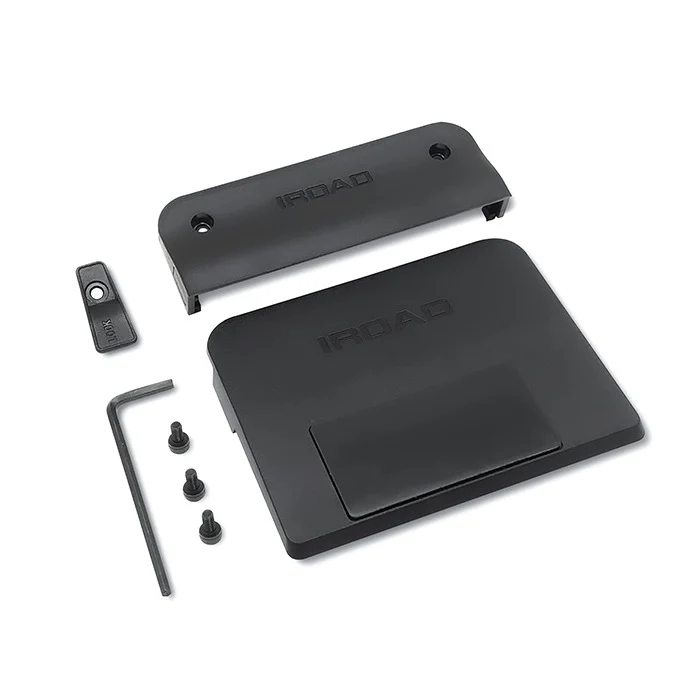
Package Contents:
- Top Cover (3M Tape)
- Bottom Cover
- SD Card Slot Cover
- Allen Wrench
- Screws
- Spare 3M Tape
Original: $39.76
-65%$39.76
$13.92Product Information
Product Information
Shipping & Returns
Shipping & Returns
Description
Security Accessory For IROAD X10/X11 & FX/QX Series!
Secure All Cables With The X-Security Cover
The IROAD X-Security Cover helps to keep cables neat. Furthermore, it prevents damage and physical access to the cables of your X10/X11 and/or FX/QX Series Dash Camera. It is a great method to protect your dash cam and your vehicle!
Prevent Memory Card Corruption
The IROAD X-Security Cover is a security accessory to protect Micro SD card slot from physical access, so that video files cannot be damaged or deleted.
IROAD X-Security Cover Installation:
- Place the security cover top plate to the X10/X11 or FX/QX Series.
- Connect each cable to the X10/X11 or FX/QX Series and organize the cables in each hole of the cover.
- Cables should be organized in order from the left.
- After fastening the bottom part of the multi-cover to top plate, tighten the screw.
- Tighten the SD cover with screw.
Steps:
- Adjust X-Security Cover and front camera of X10 and push it until it clicks into place.
- Remove double-sided tape film of the X-Security Cover and attach it to the selected location.
- Place the top cover and organized the cables. (Place the cables from left to right relative to the holes in the top cover)
- After connecting the GPS cable to the X10/X11 (not required for the FX/QX Series), place the cable to the first hole from the left. (Place the GPS cable molding towards left to connect easily)
-
After connecting the optional OBDII x-scanner cable to the X10/X11, place the cable to the second hole position. This is not used on the FX/QX Series. (Place the OBDII scanner cable molding towards right to connect easily)
- After connecting the rear cable to the X10/X11/FX2, place the cable to the third hole position.
- After connecting the power cable to the dash camera, place the cable to the first hole from the right (Place the power cable molding towards right to connect easily)
- After connecting the cables, place the bottom cover case with the top cover together and push it to the bottom to tighten.
- Tighten the screws with an allen wrench. After assembling the top, bottom cover, place the SD card cover and tighten the screws.
Compatibility:
- IROAD FX / QX Series Dashcam
- IROAD X10 / X11 Series Dashcam
Package Contents:
- Top Cover (3M Tape)
- Bottom Cover
- SD Card Slot Cover
- Allen Wrench
- Screws
- Spare 3M Tape