Aerpro SWLVTVXC Steering Wheel Control Interface Holden Calais Statesman
Aerpro SWLVTVXC Steering Wheel Control Interface Holden Calais Statesman
Retain full use of your factory steering wheel controls when upgrading to an aftermarket head unit in select Holden Calais, Commodore, Monaro, and Statesman models with premium Maestro OEM systems.
Product Overview
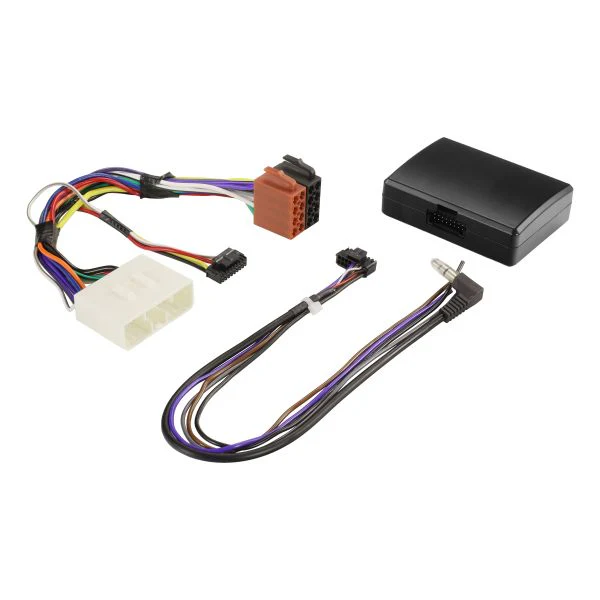
The SWLVTVXC is Aerpro's vehicle-specific analogue steering wheel control interface, engineered for Holden Calais (VT), Commodore (VT/VX/VU), Monaro (V2I), and Statesman (WH) models equipped with premium Maestro OEM audio systems. It allows the factory steering wheel audio controls to operate correctly with a compatible aftermarket head unit, maintaining driver safety by keeping hands on the wheel and eyes on the road throughout a head unit upgrade. The interface includes a vehicle-specific plug that connects directly into the existing factory wiring without cutting or modifying the original harness. Installation is further simplified when paired with the optional Aerpro APP8 Headunit Secondary ISO Harness, which connects between the aftermarket head unit and the SWLVTVXC interface. The interface uses an analogue signal output via SW patch lead type. Custom button remapping is available to customise the steering control button configuration using a USB-C cable (sold separately). Note that the aftermarket head unit must be SWC compatible, and steering wheel control functions may vary from OEM functions.
Features & Benefits
Retains Factory Steering Wheel Controls: The SWLVTVXC allows the factory steering wheel audio control buttons to operate with a compatible aftermarket head unit, preserving the OEM functionality that would otherwise be lost during a head unit upgrade.
Vehicle-Specific Plug, No Wire Cutting Required: The interface is fitted with a vehicle-specific connector designed to plug directly into the existing factory wiring, eliminating the need to cut or splice the original harness and simplifying both installation and future removal.
Improves Driver Safety: Retaining steering wheel control functionality keeps the driver's hands on the wheel and eyes on the road when adjusting volume, changing tracks, or managing audio settings, improving safety compared to reaching for the head unit directly.
Analogue Interface Type: The SWLVTVXC operates as an analogue steering wheel control interface, compatible with aftermarket head units that accept an analogue SWC input signal.
Custom Button Remapping Available: The button mapping can be customised using a USB-C cable (sold separately) to reassign steering wheel control buttons to suit the driver's preferences or the aftermarket head unit's available functions. Remapping instructions are available at aerpro.com/remapper.
Recommended for Use with Aerpro APP8 Harness: Installation is simplified when the SWLVTVXC is paired with the Aerpro APP8 Headunit Secondary ISO Harness (sold separately), which connects between the aftermarket head unit and the SWC interface for a clean, integrated wiring solution.
Technical Specs
| Specification | Detail |
|---|---|
| SKU | SWLVTVXC |
| Brand | Aerpro |
| Interface Type | Analogue |
| Patch Lead Type | SW |
| Compatible Vehicles | Holden Calais (VT), Commodore (VT/VX/VU), Monaro (V2I), Statesman (WH) |
| OEM System | Premium Maestro |
| Phone Button Compatibility | No |
| Voice Assistant Button Support | No |
| Reverse Trigger Output | No |
| Park Brake Output | No |
| Speed Pulse Output | No |
| Illumination Output | No |
| Amp Remote Output | No |
| Telephone Mute Output | No |
| OEM Amplified System Retention | No |
| Custom Button Remapping | Yes (requires USB-C cable, sold separately) |
Installation Notes
- Black wire must be connected to the Black/Yellow wire in the vehicle
- White wire must be connected to the Brown wire in the vehicle, located in the 12-pin plug
- Aftermarket head unit must be SWC compatible
- Steering wheel control functions may vary from the original OEM functions
- Recommended to install with Aerpro APP8 Headunit Secondary ISO Harness (sold separately)
- Custom button remapping requires a USB-C cable (sold separately). Remapping instructions available at aerpro.com/remapper
Compatible With
| Vehicle | Models | Notes |
|---|---|---|
| Holden Calais | VT | Premium Maestro OEM system |
| Holden Commodore | VT, VX, VU | Premium Maestro OEM system |
| Holden Monaro | V2I | Premium Maestro OEM system |
| Holden Statesman | WH | Premium Maestro OEM system |
Steering wheel control interfaces vary between models. Use the Aerpro Vehicle Selector to confirm the correct part number for your specific vehicle before purchase.
Frequently Asked Questions
Will this interface work with any aftermarket head unit?
The SWLVTVXC is compatible with aftermarket head units that support analogue steering wheel control input. Not all aftermarket head units include SWC compatibility, so confirm that the head unit being installed accepts an analogue SWC signal before purchase. Steering wheel control functions available after installation may also differ from the original OEM button functions depending on the head unit's SWC mapping.
Does installation require cutting the factory wiring harness?
No. The SWLVTVXC is fitted with a vehicle-specific plug that connects directly into the existing factory wiring without cutting or modifying the original harness. Two wires do require manual connection: the black wire to the Black/Yellow vehicle wire, and the white wire to the Brown vehicle wire in the 12-pin plug. No other wiring modifications to the factory harness are required.
What is the Aerpro APP8 and why is it recommended?
The Aerpro APP8 is a Headunit Secondary ISO Harness sold separately that connects between the aftermarket head unit and the SWLVTVXC steering wheel control interface. While not strictly required for the SWLVTVXC to function, the APP8 provides a cleaner, more integrated wiring solution that simplifies the overall installation and reduces the number of loose connections at the head unit end of the install.
Can I remap the steering wheel control buttons to different functions?
Yes. The SWLVTVXC supports custom button remapping, which allows the steering wheel control buttons to be reassigned to different head unit functions beyond the default mapping. Remapping requires a USB-C cable (sold separately) and is performed following the instructions at aerpro.com/remapper.
How do I confirm this is the correct SWC interface for my vehicle?
Steering wheel control interfaces vary between vehicle models and OEM audio system configurations. Use the Aerpro Vehicle Selector tool to confirm the correct part number for your specific Holden model, build date, and OEM audio system before purchase. The SWLVTVXC is specifically engineered for premium Maestro OEM systems in the listed Holden models and is not suitable for other system configurations.
Original: $90.36
-65%$90.36
$31.63Product Information
Product Information
Shipping & Returns
Shipping & Returns
Description
Aerpro SWLVTVXC Steering Wheel Control Interface Holden Calais Statesman
Retain full use of your factory steering wheel controls when upgrading to an aftermarket head unit in select Holden Calais, Commodore, Monaro, and Statesman models with premium Maestro OEM systems.
Product Overview
The SWLVTVXC is Aerpro's vehicle-specific analogue steering wheel control interface, engineered for Holden Calais (VT), Commodore (VT/VX/VU), Monaro (V2I), and Statesman (WH) models equipped with premium Maestro OEM audio systems. It allows the factory steering wheel audio controls to operate correctly with a compatible aftermarket head unit, maintaining driver safety by keeping hands on the wheel and eyes on the road throughout a head unit upgrade. The interface includes a vehicle-specific plug that connects directly into the existing factory wiring without cutting or modifying the original harness. Installation is further simplified when paired with the optional Aerpro APP8 Headunit Secondary ISO Harness, which connects between the aftermarket head unit and the SWLVTVXC interface. The interface uses an analogue signal output via SW patch lead type. Custom button remapping is available to customise the steering control button configuration using a USB-C cable (sold separately). Note that the aftermarket head unit must be SWC compatible, and steering wheel control functions may vary from OEM functions.
Features & Benefits
Retains Factory Steering Wheel Controls: The SWLVTVXC allows the factory steering wheel audio control buttons to operate with a compatible aftermarket head unit, preserving the OEM functionality that would otherwise be lost during a head unit upgrade.
Vehicle-Specific Plug, No Wire Cutting Required: The interface is fitted with a vehicle-specific connector designed to plug directly into the existing factory wiring, eliminating the need to cut or splice the original harness and simplifying both installation and future removal.
Improves Driver Safety: Retaining steering wheel control functionality keeps the driver's hands on the wheel and eyes on the road when adjusting volume, changing tracks, or managing audio settings, improving safety compared to reaching for the head unit directly.
Analogue Interface Type: The SWLVTVXC operates as an analogue steering wheel control interface, compatible with aftermarket head units that accept an analogue SWC input signal.
Custom Button Remapping Available: The button mapping can be customised using a USB-C cable (sold separately) to reassign steering wheel control buttons to suit the driver's preferences or the aftermarket head unit's available functions. Remapping instructions are available at aerpro.com/remapper.
Recommended for Use with Aerpro APP8 Harness: Installation is simplified when the SWLVTVXC is paired with the Aerpro APP8 Headunit Secondary ISO Harness (sold separately), which connects between the aftermarket head unit and the SWC interface for a clean, integrated wiring solution.
Technical Specs
| Specification | Detail |
|---|---|
| SKU | SWLVTVXC |
| Brand | Aerpro |
| Interface Type | Analogue |
| Patch Lead Type | SW |
| Compatible Vehicles | Holden Calais (VT), Commodore (VT/VX/VU), Monaro (V2I), Statesman (WH) |
| OEM System | Premium Maestro |
| Phone Button Compatibility | No |
| Voice Assistant Button Support | No |
| Reverse Trigger Output | No |
| Park Brake Output | No |
| Speed Pulse Output | No |
| Illumination Output | No |
| Amp Remote Output | No |
| Telephone Mute Output | No |
| OEM Amplified System Retention | No |
| Custom Button Remapping | Yes (requires USB-C cable, sold separately) |
Installation Notes
- Black wire must be connected to the Black/Yellow wire in the vehicle
- White wire must be connected to the Brown wire in the vehicle, located in the 12-pin plug
- Aftermarket head unit must be SWC compatible
- Steering wheel control functions may vary from the original OEM functions
- Recommended to install with Aerpro APP8 Headunit Secondary ISO Harness (sold separately)
- Custom button remapping requires a USB-C cable (sold separately). Remapping instructions available at aerpro.com/remapper
Compatible With
| Vehicle | Models | Notes |
|---|---|---|
| Holden Calais | VT | Premium Maestro OEM system |
| Holden Commodore | VT, VX, VU | Premium Maestro OEM system |
| Holden Monaro | V2I | Premium Maestro OEM system |
| Holden Statesman | WH | Premium Maestro OEM system |
Steering wheel control interfaces vary between models. Use the Aerpro Vehicle Selector to confirm the correct part number for your specific vehicle before purchase.
Frequently Asked Questions
Will this interface work with any aftermarket head unit?
The SWLVTVXC is compatible with aftermarket head units that support analogue steering wheel control input. Not all aftermarket head units include SWC compatibility, so confirm that the head unit being installed accepts an analogue SWC signal before purchase. Steering wheel control functions available after installation may also differ from the original OEM button functions depending on the head unit's SWC mapping.
Does installation require cutting the factory wiring harness?
No. The SWLVTVXC is fitted with a vehicle-specific plug that connects directly into the existing factory wiring without cutting or modifying the original harness. Two wires do require manual connection: the black wire to the Black/Yellow vehicle wire, and the white wire to the Brown vehicle wire in the 12-pin plug. No other wiring modifications to the factory harness are required.
What is the Aerpro APP8 and why is it recommended?
The Aerpro APP8 is a Headunit Secondary ISO Harness sold separately that connects between the aftermarket head unit and the SWLVTVXC steering wheel control interface. While not strictly required for the SWLVTVXC to function, the APP8 provides a cleaner, more integrated wiring solution that simplifies the overall installation and reduces the number of loose connections at the head unit end of the install.
Can I remap the steering wheel control buttons to different functions?
Yes. The SWLVTVXC supports custom button remapping, which allows the steering wheel control buttons to be reassigned to different head unit functions beyond the default mapping. Remapping requires a USB-C cable (sold separately) and is performed following the instructions at aerpro.com/remapper.
How do I confirm this is the correct SWC interface for my vehicle?
Steering wheel control interfaces vary between vehicle models and OEM audio system configurations. Use the Aerpro Vehicle Selector tool to confirm the correct part number for your specific Holden model, build date, and OEM audio system before purchase. The SWLVTVXC is specifically engineered for premium Maestro OEM systems in the listed Holden models and is not suitable for other system configurations.